|
Save sync pulse times
Interfacing Tosca with Synapse ›› Setting up Synapse ›› Set up Experiment ››
  
The sync pulses generated by Tosca are timestamped and recorded using "epoch" storage.
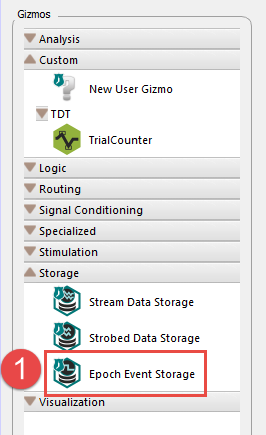
1. Under "Gizmos", select "Storage > Epoch Event Storage" and drag onto the TDT processor (e.g. RZ2 or RZ5).
2. In the Options panel at the far right, click on the button shown
3. Click on the pencil button, and change the name of the Gizmo. The example shown is for the storage of the Impale Trial marker.
4. Set the "Main" and "StrobeIn" inputs to the digital input for the sync pulse (see table below).
5. Set the "Trigger Options" as shown
6. Set the "Store Options" as shown.
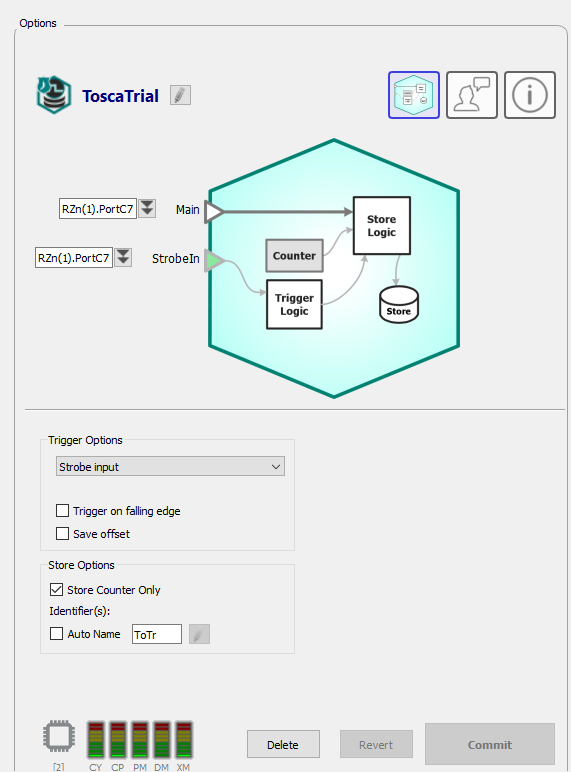
Repeat for each of the other sync pulses, using the settings in this table:
|
Name
|
Main/StrobeIn
|
Store name
|
|
ToscaTrial
|
RZn(1).PortC7
|
ToTr
|
|
ToscaState
|
RZn(1).PortC6
|
ToSt
|
|
ToscaRep
|
RZn(1).PortC5
|
ToRe
|
|
ImpaleTrial
|
RZn(1).PortC0
|
ImTr
|
|

